Module 01 — Meeting Deck

Meeting minutes. Already formatted. Ready to share.

Log every meeting in a structured format — attendees, discussion points, key takeaways, and action items. Already using Copilot or another AI meeting tool? Paste your summary directly into the Meeting Deck, then select any action item and convert it to a task with one tap — no rebuilding, no re-typing.

1

Log your meeting

Record attendees, discussion, key takeaways and action items in one structured place.

2

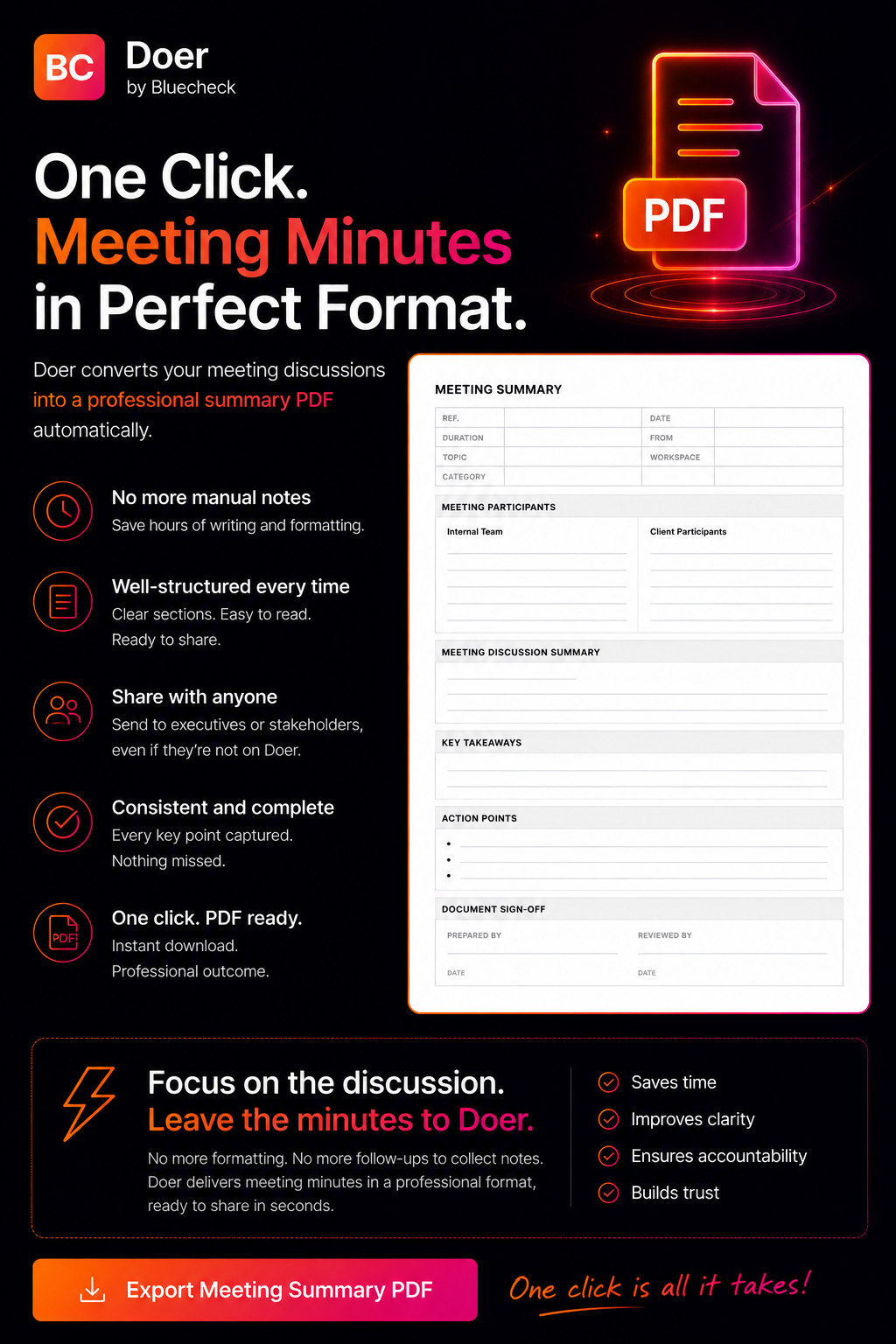
Download minutes PDF

One click generates a formatted meeting minutes PDF — ready to share instantly.

3

Share with anyone

Send to executives or stakeholders — even if they're not on Doer. Professional format every time.

  • Structured meeting record — attendees, summary, takeaways, action items
  • Paste Copilot or AI summaries into the Meeting Deck — then select & convert to tasks manually
  • Download meeting minutes as PDF in one click
  • Action Items tab shows all tasks linked to that meeting
  • Permanent, searchable record — never lose a meeting decision
Doer Meeting Deck — structured meeting minutes with action items
Module 02 — Task Creation

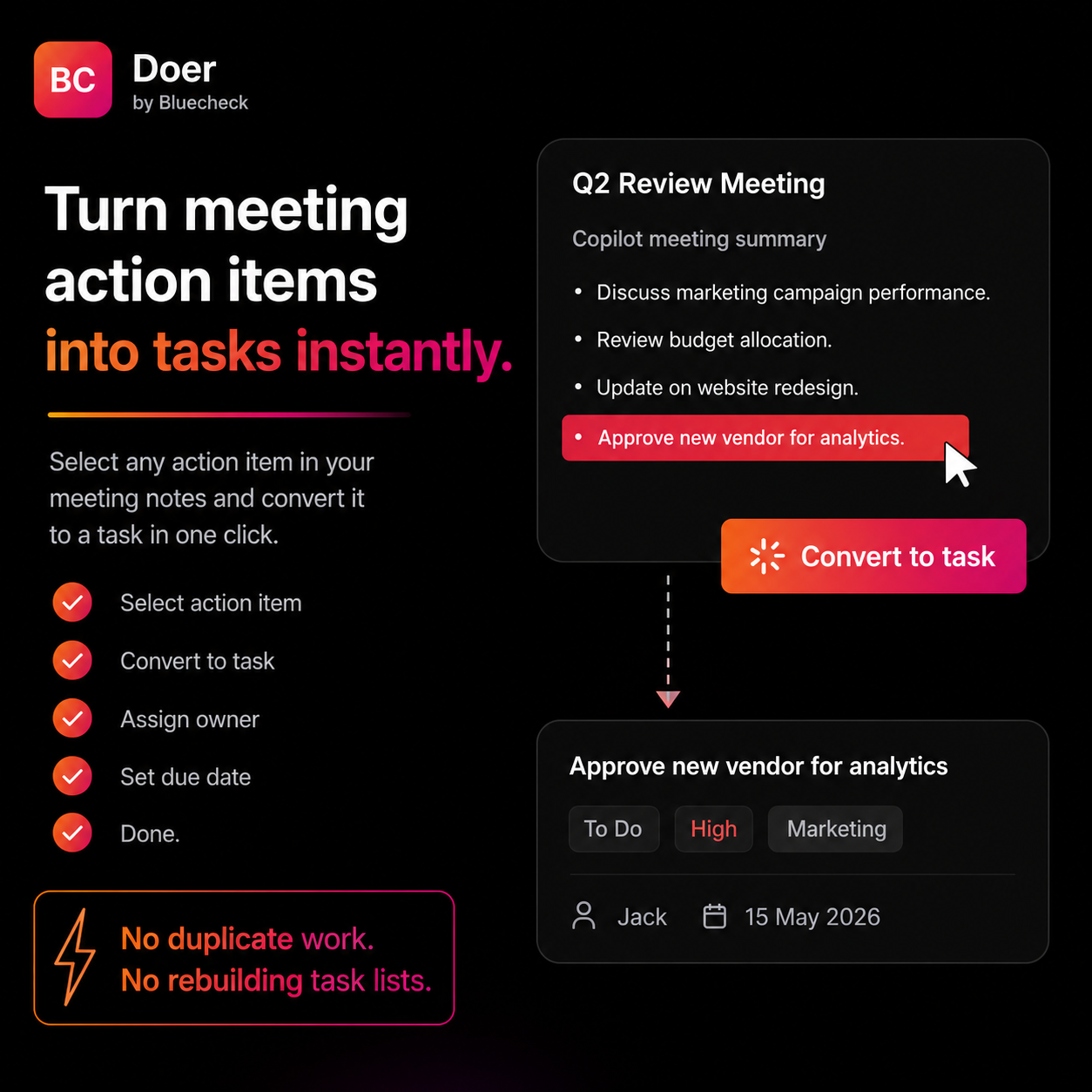
Turn meeting action items into tasks instantly.

Select any action point from your meeting notes. One tap converts it to an owned task — with assignee, due date, priority, and category. No duplicate work. No rebuilding lists.

  • Highlight any action item → Convert to task in one tap
  • Assign owner, set due date, choose priority immediately
  • Tasks require mandatory reviewer sign-off before closing
  • Categorise tasks by team, project, or client
  • Export full task list to Excel in one click
Converting a meeting action item to an owned task in Doer
Module 03 — Dashboard

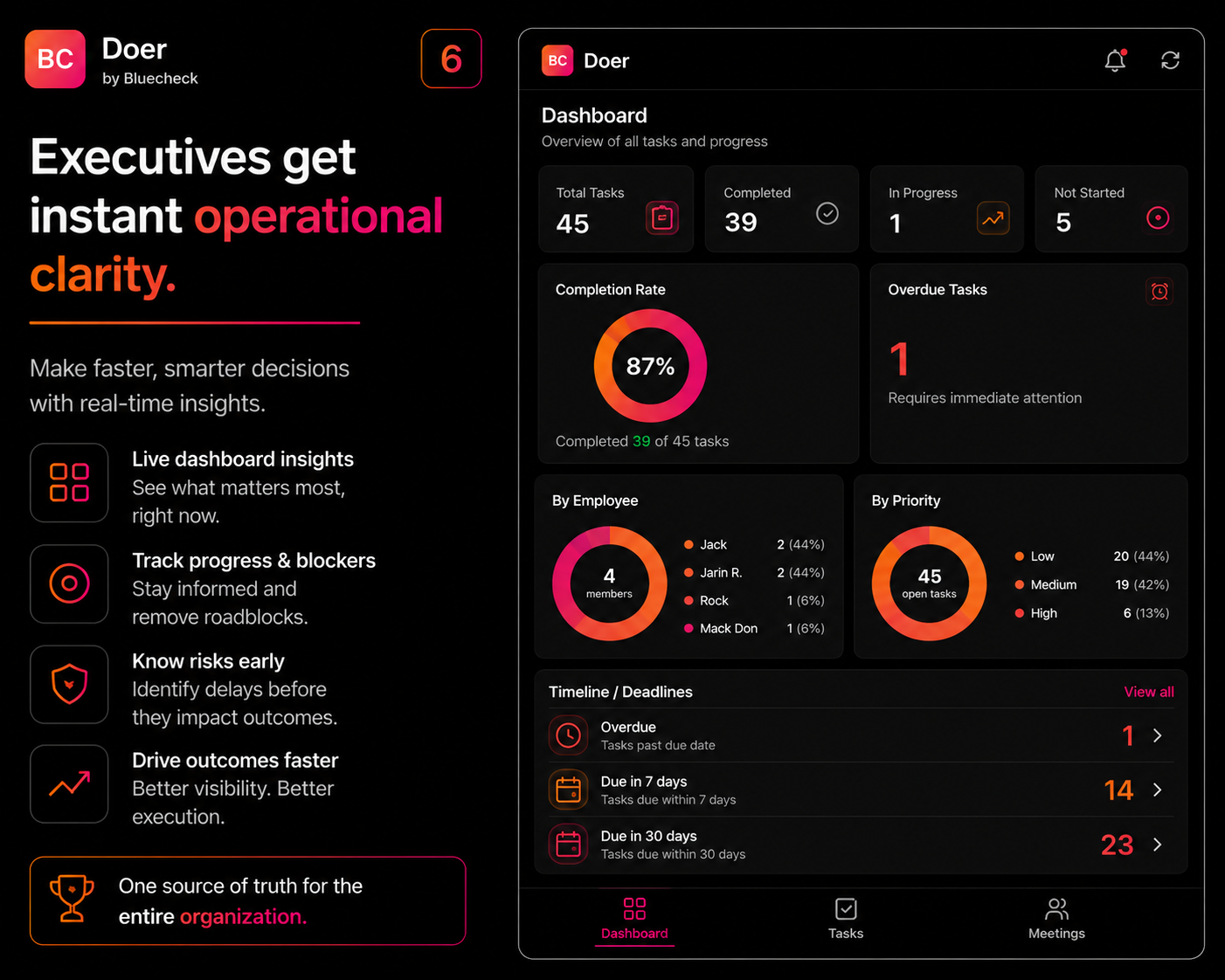
Executives get instant operational clarity.

A live dashboard shows every task across your team — completion rate, overdue count, breakdown by employee and priority. Make decisions in seconds, not meetings.

  • Total Tasks, Completed, In Progress, Not Started, Overdue — at a glance
  • Employee summary — see open tasks per team member
  • Timeline view — Overdue / Due in 7 days / Due in 30 days
  • By Priority breakdown — High, Medium, Low
  • Filter by category, team member, or date range
Doer executive dashboard — task completion and team overview
Module 04 — Reports

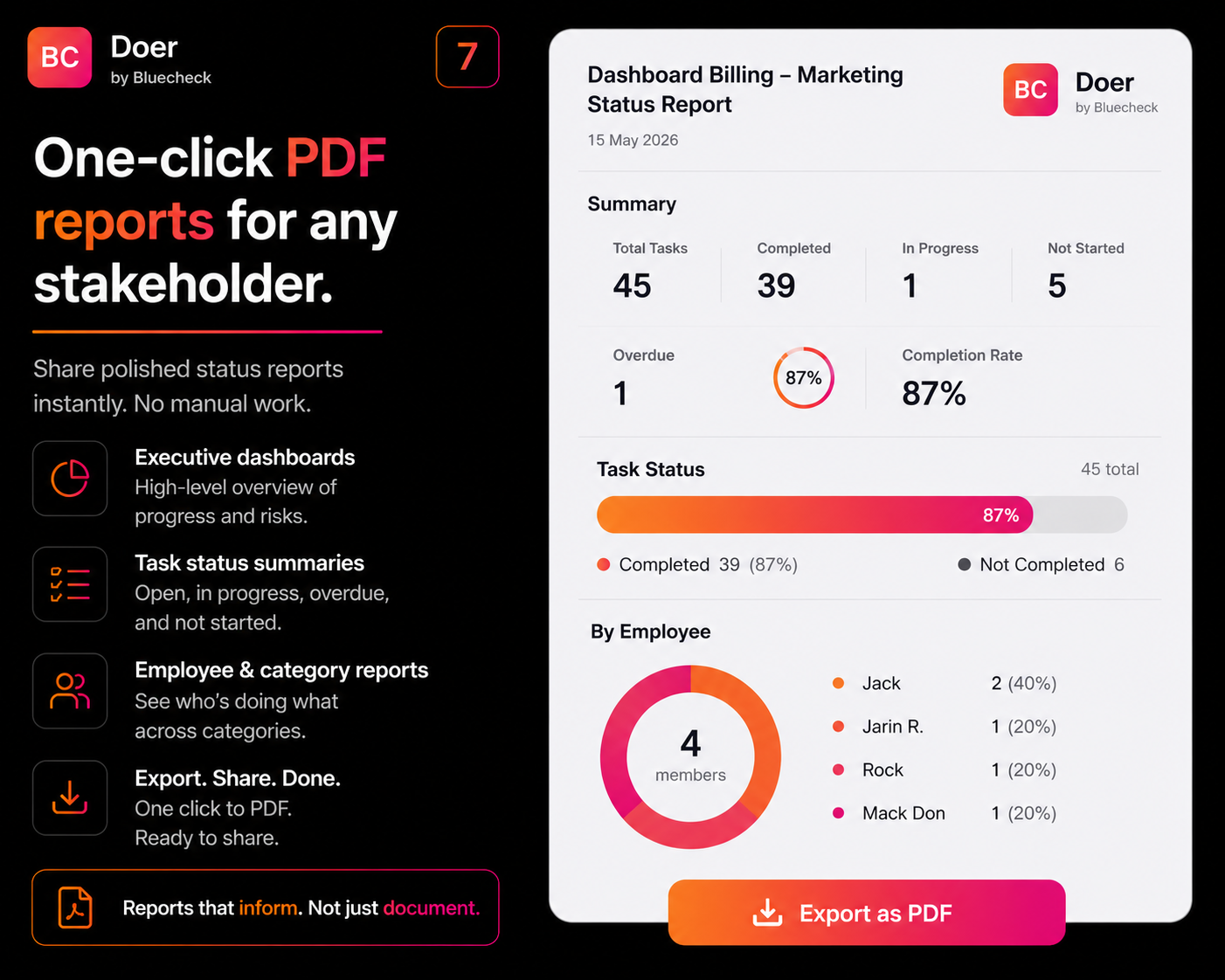
One-click PDF reports for any stakeholder.

Generate a polished status report in one click — executive summary, task breakdown, completion rate, by employee and category. No manual work. Share instantly with clients, leadership, or boards.

  • High-level executive summary — completion rate and overdue count
  • Task status by employee and category
  • Export all tasks to Excel — owner, due date, status, priority
  • Branded PDF — your workspace name and date stamped
  • No manual compilation — reports that inform, not just document
Doer one-click PDF status report
Module 05 — Access & Experience

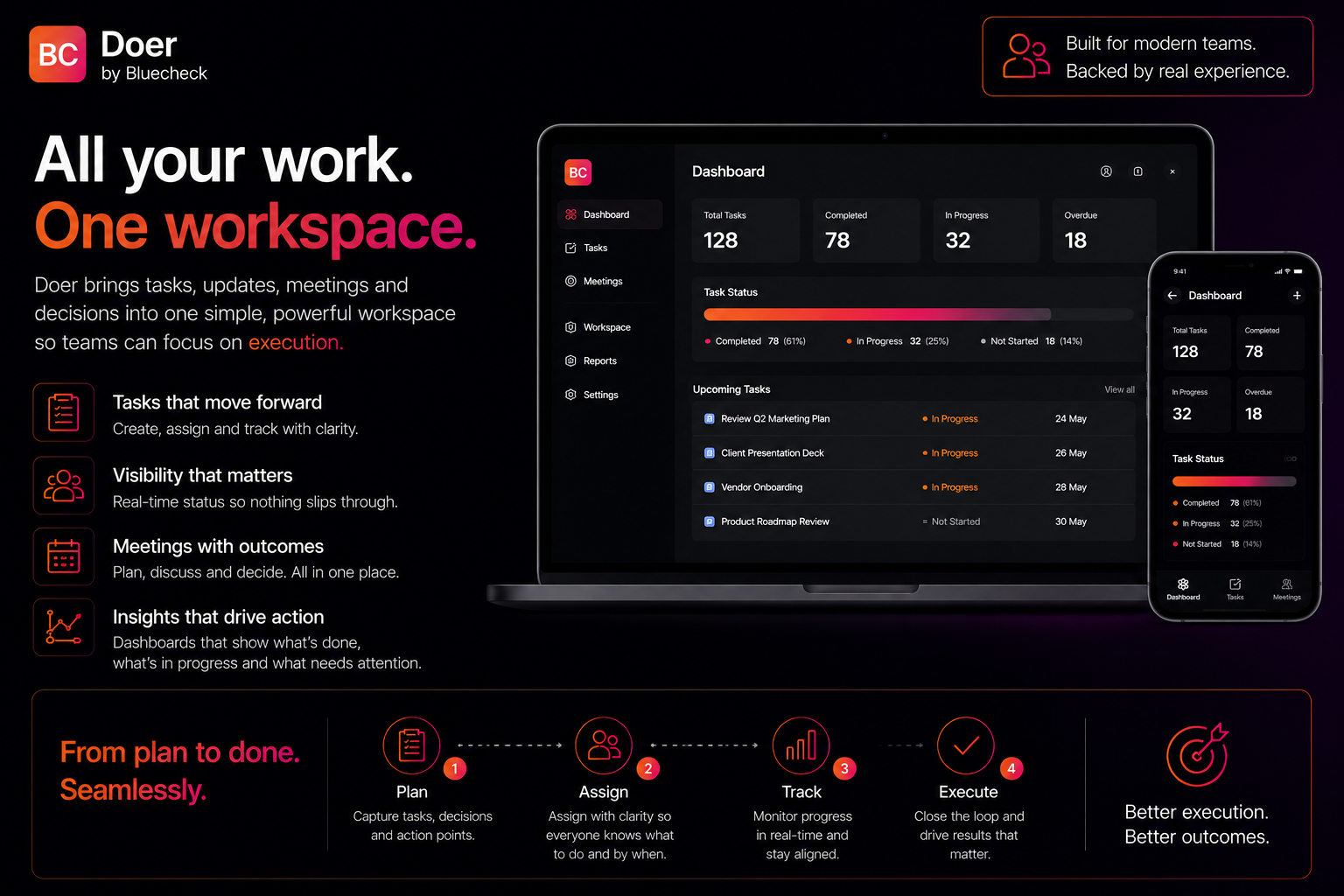
Work from anywhere. Stay in sync everywhere.

Doer is a Progressive Web App (PWA) — no app store, no downloads, no approvals. Open it in your browser on any device and you're ready. Choose from four themes to match your workspace style.

  • PWA — works on mobile, tablet, and desktop browsers
  • No app store. No installations. No delays.
  • Real-time sync across all devices
  • Four themes — Mono Black, Mono White, Dark Gradient, White Gradient
  • Switch themes anytime — same experience on every screen
Doer on mobile, desktop and tablet — PWA cross-device

How Doer works for your role.

Different people. Different needs. One workspace that works for all of them.

  • 1
    Admin shares the email template

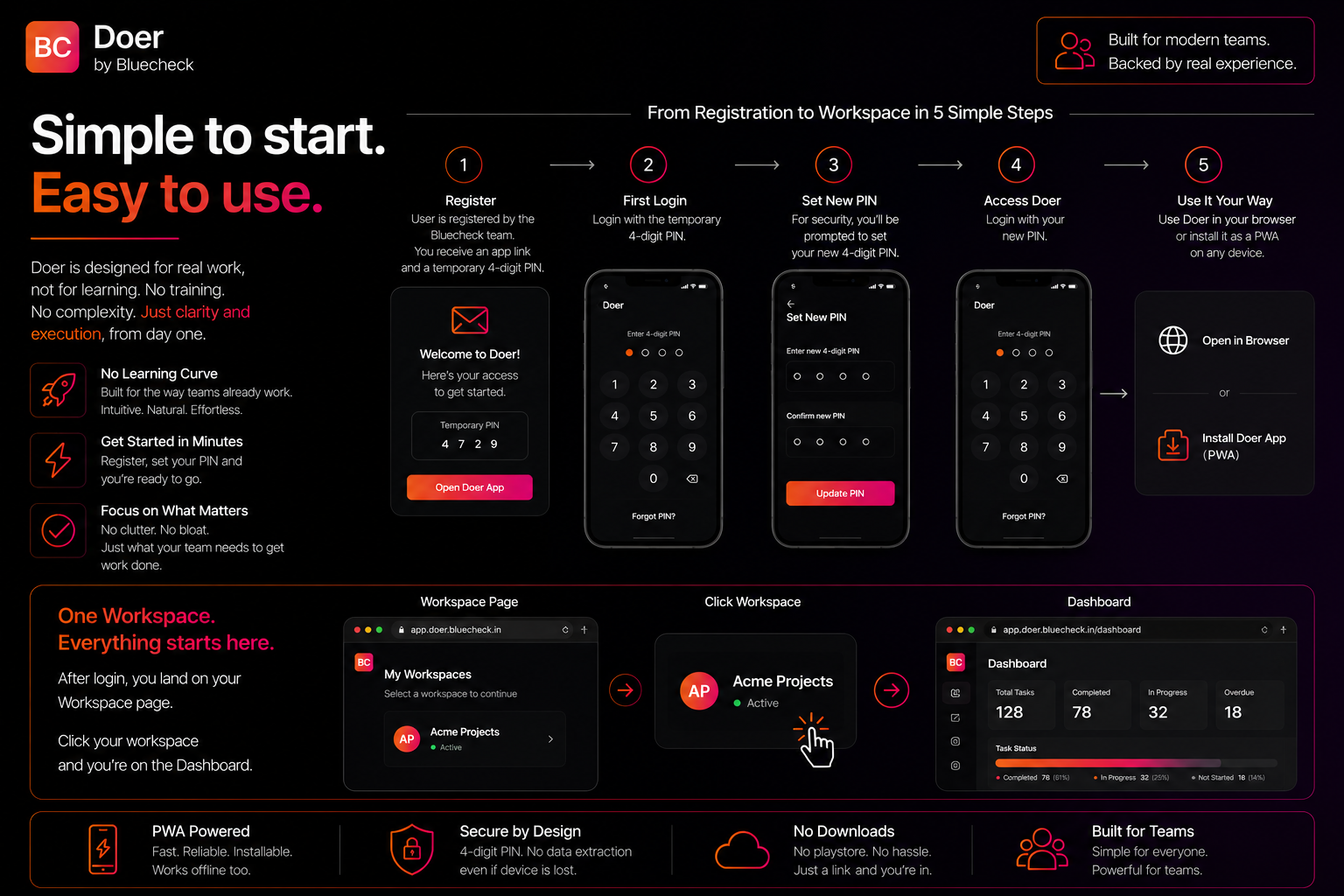
    Your Admin provides you with an email template to send to the Bluecheck team to request your account.

  • 2
    You email the Bluecheck team

    Send the email with your full name, email address, and workspace name — from the exact email you want to use. The email domain must be on your workspace allowlist.

  • 3
    Bluecheck creates your account

    The Bluecheck team sets up your account and sends your app link with a temporary 4-digit PIN. Your Admin is notified too.

  • 4
    Set your PIN & access workspace

    On first login, set your own 4-digit PIN. Select your workspace and your dashboard loads with your assigned tasks.

  • 5
    Track, update & complete

    See your open tasks, priorities, and deadlines. Update progress in real time. Mark done — reviewer signs off to close.

How to get started with Doer — 5 step onboarding
  • 1
    You subscribe

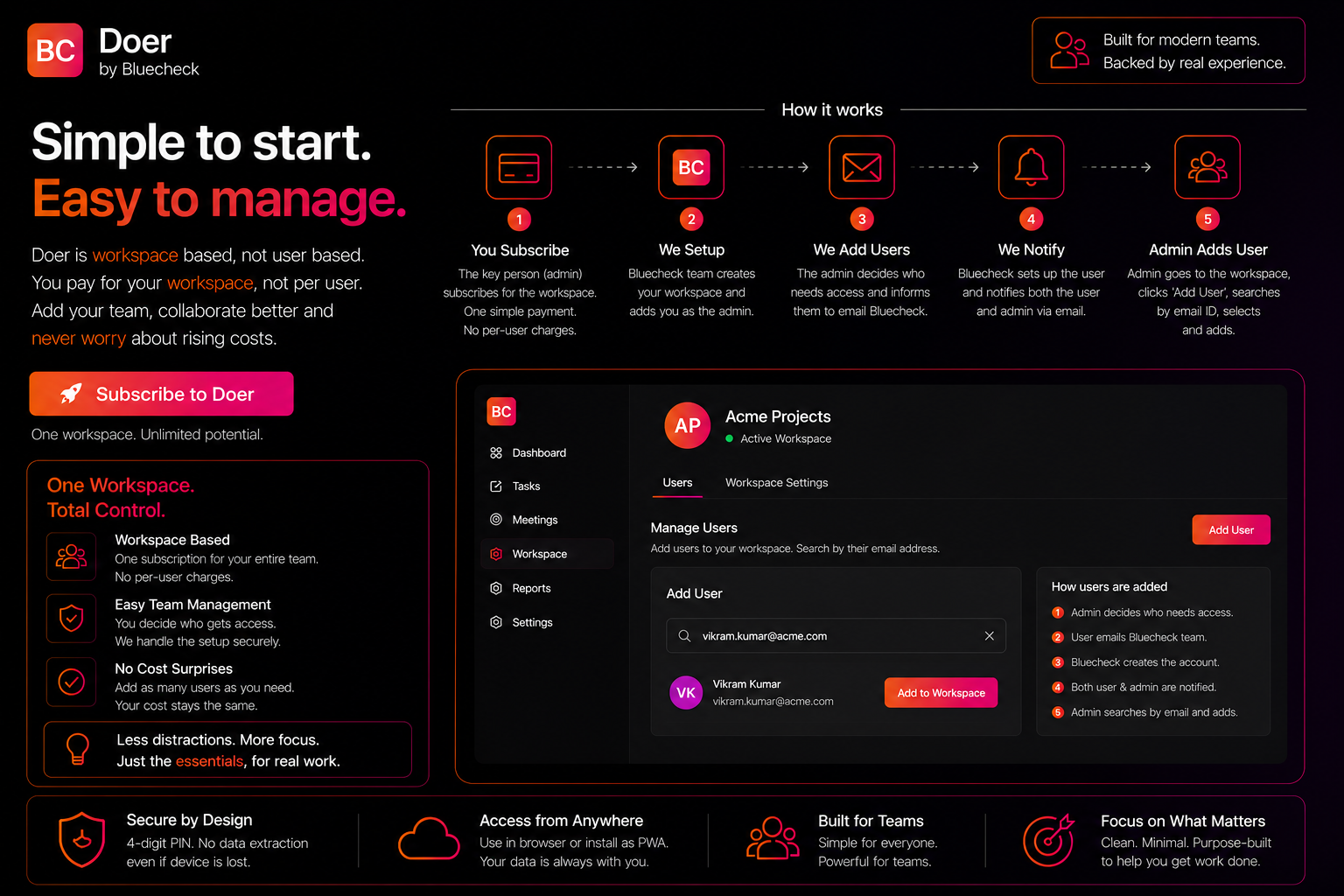
    You subscribe for the workspace. The Bluecheck team creates your workspace and adds you as Admin. One simple workspace fee — not per user.

  • 2
    Decide who needs access & inform Bluecheck

    You decide which team members need access. Each person emails the Bluecheck team to request their account.

  • 3
    Bluecheck creates accounts & notifies everyone

    The Bluecheck team creates each user account and notifies both the user and you (Admin) via email with their app link and temporary PIN.

  • 4
    Admin adds users to the workspace

    You go to the workspace, click Add User, search by their email ID, and add them. They're now part of your workspace.

  • 5
    Log meetings, create tasks & monitor

    Record meetings, convert action items to assigned tasks, and monitor your team dashboard — all tasks, deadlines, and progress in real time.

How Doer workspace subscription works — subscribe, setup, add team

Built on Google Cloud. Designed to stay within boundaries.

Doer stores only structured text — no file attachments of any kind. Every access decision is enforced at the infrastructure level, not just application logic.

Google Cloud Hosting

Hosted on Google Cloud Mumbai (asia-south1). ISO 27001, SOC 1/2/3, and PCI DSS certified infrastructure. Enterprise-grade without the enterprise overhead.

4-Digit PIN Verification

Every user is protected by a 4-digit PIN. Verification happens through secure cloud functions — even a lost device cannot extract any data.

Domain-Level Access Control

Per-workspace email domain allowlists managed by the Bluecheck team. A user from one organisation cannot access another's workspace — blocked by architecture.

No File Uploads — Ever

Doer stores only structured text. No PDFs, spreadsheets, or images. Text-only architecture eliminates any vector for document leakage and minimises your data surface.

GDPR & UK GDPR Ready

EU Standard Contractual Clauses (2021/914) and UK IDTA available. Signed Data Processing Agreement provided on request. Compliant with India DPDPA 2023.

Why teams choose Doer over spreadsheets and generic tools.

Not sure if Doer is the right fit for your team? See a full breakdown of who gets the most from it — and who probably doesn't. See who Doer is for →

Capability Doer Spreadsheets Generic task tools
Meeting → task in one tap
Paste Copilot/AI summary, convert to tasks
Mandatory reviewer sign-off
Real-time executive dashboardPartial
One-click PDF meeting minutes
Domain-level access security
No file attachments (text only)
Workspace-based pricing (not per user)N/A
PWA — works in any browserPartial
GDPR, UK GDPR, DPDPA 2023Partial

No hidden features. No paid add-ons.

Meeting Deck

Structured meeting log with attendees, takeaways & action items.

One-tap Task Creation

Convert any action item to an owned task instantly.

Copilot & AI Paste

Paste any AI meeting summary, then select action items and convert them to tasks manually.

Real-time Dashboard

Live task status across every team member and project.

PDF Meeting Minutes

Download formatted minutes with one click.

PDF Status Reports

One-click stakeholder reports — no manual work.

Excel Export

Export all tasks with owner, date, status, and priority.

Mandatory Sign-off

Tasks close only with reviewer approval — no exceptions.

PWA Access

Works on any browser, any device. No download needed.

4 Themes

Mono Black, Mono White, Dark & White Gradient. Switch anytime.

Domain Security

Only approved email domains can access your workspace.

Employee Timeline

Overdue / due in 7 days / due in 30 days — always visible.

See every feature in your own workspace.

Get in touch and we'll set up Doer with your team's actual workflow in mind. No generic demo.